
lichii-windows-x86_64-pgo.zip
83.3 MB87342665 bytes
SHA-2561d1d2aef20f73d2b426863dc9b203c6a2920e3a6882019afe6b34c74d79929ac
Direct linkhttps://github.com/zortos293/Lichii/releases/download/build-117/lichii-windows-x86_64-pgo.zip
Lichii is a very experimental Nintendo Switch 2 emulator for Windows, Linux and Apple Silicon Macs, built in the open at github.com/zortos293/Lichii. The newest release is build 117, which fixes the build 116 crash on older AMD cards while Ocarina of Time compiles its shaders. Choose your system and CPU below: the receipt names the exact file, its size, its full SHA-256 checksum and the GitHub link it comes from.
The PGO package is the release's recommended download. Pick a row below to load a different package into the receipt.
lichii-windows-x86_64-pgo.zip
There is no official Lichii package for this system and CPU. Official builds cover Windows x86_64, Linux x86_64 and aarch64, and Apple Silicon Macs.
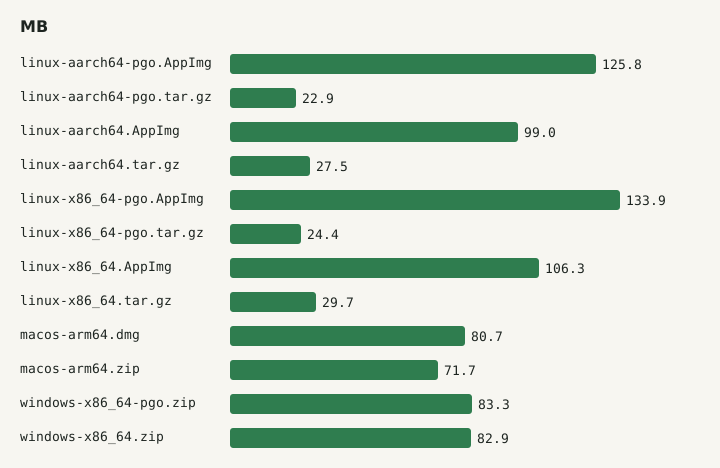
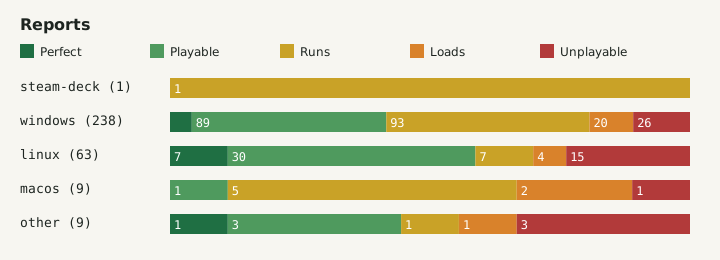
Check platform supportBuild 117 ships twelve packages. Each one is listed with its operating system, CPU architecture, variant, exact byte size, checksum and direct GitHub address, so you can match a file you already downloaded against the real one.
12 / 12 files shown
No build 117 package matches this system and CPU.
Lichii builds on Eglantine, Eden, yuzu and Sudachi and is licensed under GPL-3.0. Releases up to build 65 still carried the Eglantine nx2 name before the project became Lichii. Every release is an automatic build of the nx2 branch.
No games, keys or firmware come with Lichii. The README asks you to use only games and system files you obtained legally, and to back up your saves before you try an experimental build.
Lichii reuses the existing Eden and Eglantine data folders and settings. It does not move or delete saves, configuration or shader caches, so switching from Eden keeps your progress where it was.
Searches for "litchi emulator", "lichi emulator", "liichi" and "liichi emulator" all mean this project. The name is spelled Lichii, with two i's at the end, and its only home is the zortos293/Lichii repository on GitHub. Websites built around the other spellings are run by third parties, not by the Lichii developers, so never take an installer from them.
Yes. Lichii is open source under GPL-3.0 and costs nothing. The project states that it has no download site other than its GitHub releases page at github.com/zortos293/Lichii/releases. Any site asking you to pay, sign up or install a separate downloader is not the project.
Take the PGO build first. The build 117 release notes call it the recommended and most stable download; the Windows PGO zip adds a clang-cl ThinLTO profile trained on Ocarina of Time. The standard build stays available for anyone whose system has problems with the PGO package.
None of the fifteen published releases includes an Android APK, so any Lichii APK comes from someone else. Steam Deck runs Linux on an x86_64 CPU, so the Linux x86_64 AppImage is the matching package; ARM Linux machines use the aarch64 AppImage or tar.gz.
Compare its SHA-256 checksum with the value in the receipt above. On Windows run Get-FileHash in PowerShell, on Linux run sha256sum and on macOS run shasum -a 256 on the file. If even one character differs, delete the file and download it again from GitHub.