nx2 · latest build 117 89440b2 released Nov 7, 2026 12 packages Official downloads: GitHub releases only

Zelda Ocarina of Time Emulator: Running the Switch 2 Remake in Lichii

Current status Boots and plays. Build 117 fixes the AMD shader-build crash that hit RX 6000 and older cards in build 116. build-117 · 89440b2 Get build 117

Lichii is the emulator most players use to run the Switch 2 remake of The Legend of Zelda: Ocarina of Time on PC. It went from aborting after 20 seconds to a stable 60 fps for many users in six releases over three days. This page lists what each of those builds changed for the game, which build to pick for your graphics card, the settings that fix the remaining visual problems, and how running the remake differs from a native PC port of the original.

250Community reports for the game
107Rated Perfect or Playable
75First build that plays
12Game-specific fixes logged

Six builds that made it playable

Pick a build to see the problems it fixed. Builds 116 and 117 were published the same day, and the build-94 tag actually contains build 95.

Boots, gets through the intro and plays

ChangesThe abort after about 20 seconds is fixed by porting Eglantine #567, and about 80 shaders now translate (#87).
NoteOutdoor fog and glow are too strong. Developer testing on a Ryzen 5900X with an RTX 3080 gave 12 to 22 fps.

Vegetation, grass and lighting

ChangesMissing vegetation, grass instance data, sky-ambient lighting, the glowing doorway, one-frame white flashes and the black scene on AMD are all fixed.
NoteThe built-in Max Resolution add-on is switched on by default for the supported game version.

Dynamic FPS mod bundled

ChangesDark's Dynamic FPS mod ships enabled by default for this game. You can switch it off in the game's Add-Ons list.
NoteKeep CPU Clock on Normal while the mod is active.

Foliage and camera fixes

ChangesNear foliage no longer fades (#410), camera movement stops causing white flashes (#215), the terrain layer draws correctly (#185) and the Z-target reticle no longer sticks (#397).
NoteGerudo Valley rock and canyon shaders now compile (#241).

Very stable, 60+ fps for many users

ChangesHyrule Field grass returns (#551), an NVIDIA DLSS option arrives (#606), a mesh-shader fallback is added (#569), and matrix units take RDNA4 cards from 41 to 60 fps (#583).
NoteWhite streaks at night: turn off the DLSS replacement option.

AMD shader-build crash fixed

ChangesThe crash in amdvlk64.dll on RX 6000, RX 5000, Vega and Polaris cards is fixed (#657).
NoteOtherwise identical to build 116. The PGO download is recommended.

Fixed in this build

build-117
All fixes →
Fixed Crash in amdvlk64.dll while Ocarina of Time builds shaders after boot #657

Which build for your graphics card

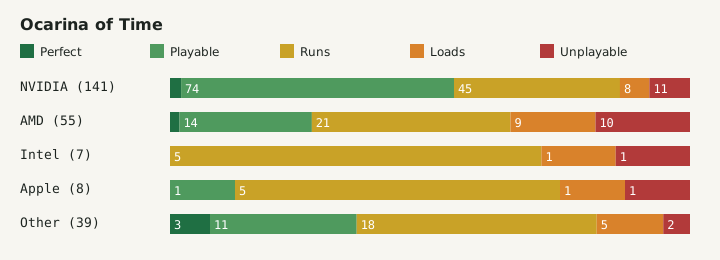
Of the 250 community reports for the remake, NVIDIA cards make up the bulk and also give the best results. AMD results improved sharply with builds 116 and 117, but older Radeon generations should never stay on build 116.

GPU vendorReportsPerfect or PlayableBuild advice
NVIDIA 141 77 Build 117 PGO. Turn off the DLSS replacement option if you see white streaks at night.
AMD 55 15 Build 117 only. Build 116 crashes on RX 6000, RX 5000, Vega and Polaris while shaders build.
Intel 7 0 Build 117. Few reports, mostly Runs: expect slowdowns.
Apple 8 1 Build 117 for macOS. The app is not notarized; reports are mostly Runs.
Other 39 14 Build 117 for your platform.
Stacked bars of Ocarina of Time report outcomes by GPU vendor
Report outcomes per GPU vendor, from the Lichii compatibility site.
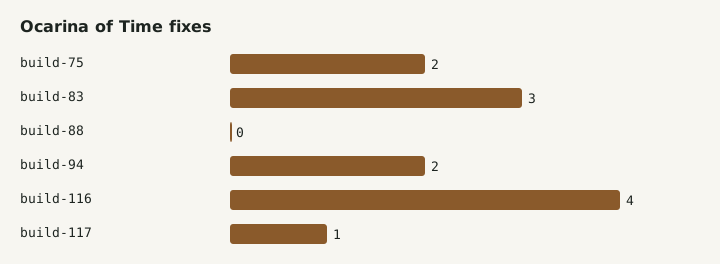
Bar chart of Ocarina of Time fixes per Lichii build
Game-specific fixes per build, counted from the Lichii release notes.

Settings that fix what is left

01

White streaks at night

Navi, fireflies and smoke leave white trails on RTX cards when DLSS replaces the game's upscaler. Open Emulation > Configure > Graphics and untick Use NVIDIA DLSS in place of a game's DLSS.

02

Frame rate mod

Since build 88 Dark's Dynamic FPS mod is on by default. If animations or physics look wrong, right-click the game, open Add-Ons and untick it. With it on, keep CPU Clock at Normal.

03

PGO or standard

Build 117 recommends the PGO package. On Windows it is compiled with a ThinLTO profile trained on this game, so it is the natural first choice. Use the standard package only if the PGO one misbehaves on your machine.

Remake emulation or native PC port

Searches for an Ocarina of Time PC port usually mix up two different things. They are not alternatives for the same game.

Lichii (Switch 2 remake)

  • Runs the Switch 2 remake released on 5 November 2026.
  • Needs your own game dump, keys and firmware.
  • Experimental: visual bugs remain and results depend heavily on your GPU.
  • Saves stay in the Eden and Eglantine data directories.

Ship of Harkinian (N64 original)

  • A separate native PC port of the 1998 Nintendo 64 game, by HarbourMasters.
  • Needs your own supported ROM dump of the N64 game.
  • Not an emulator and unrelated to the remake.
  • Cannot load Switch 2 saves or files.

Outside tests and tools

Notebookcheck

Before release

Reported the remake running in Lichii before its 5 November release, at 20 to 60 fps with stutter.

Pro-Gamer

Build 75 telemetry

Measured 60 fps on an RTX 5080 at about 25% GPU load, but CPU-bound drops to 15 to 30 fps outdoors.

OcarinaSaveBridge

Moving saves

A third-party Windows tool moves compatible saves from Lichii or Eden to NX2navi, with backups and full-profile rollback.

Frequently asked questions

Which Lichii build should I use for Ocarina of Time?

Use build 117, preferably the PGO package. It contains every Ocarina of Time fix so far and repairs the build 116 shader-build crash on AMD RX 6000, RX 5000, Vega and Polaris cards. Builds older than 75 do not get past the first 20 seconds.

Why does Ocarina of Time crash on my AMD card after boot?

Build 116 used a matrix-core path that older Radeon drivers report but cannot run, so the game crashed in amdvlk64.dll while building shaders. Build 117 limits that path to RDNA3 and newer cards. Updating to build 117 fixes it.

Is Ship of Harkinian the same as running the remake in Lichii?

No. Ship of Harkinian is a native PC port of the 1998 Nintendo 64 game and needs an N64 ROM dump. Lichii emulates the Switch 2 and runs the 2026 remake from your own game dump. They share a story, not files or saves.

How do I get rid of the white streaks at night?

They come from NVIDIA DLSS replacing the game's own upscaler. In Lichii open Emulation, Configure, Graphics and turn off Use NVIDIA DLSS in place of a game's DLSS. The trails on Navi, fireflies and smoke disappear.