
fixed crash
Crash in amdvlk64.dll while Ocarina of Time builds shaders after boot
Fix Update to build 117: the matrix path from #583 now only runs on RDNA3 and newer
Lichii black screen fix, AMD crash fix and the cure for white streaks at night are all in the table below. Each of the 21 documented problems is matched to the build that fixed it or to the setting that works around it, taken from the Lichii release notes and pull requests. Start by checking which build you run: most entries are solved simply by moving to build 117.
Fix Update to build 117: the matrix path from #583 now only runs on RDNA3 and newer
Fix Update to build 116 or newer: the allocation now fails cleanly
Fix Update to build 95 (tag build-94) or newer
Fix Update to build 70 or newer
Fix Turn off Emulation > Configure > Graphics > Use NVIDIA DLSS in place of a game's DLSS
Fix Update to build 116 or newer
Fix Update to build 116 or newer
Fix Update to build 116 or newer: mesh scenes run through compute
Fix Update to build 95 (tag build-94) or newer
Fix Update to build 95 (tag build-94) or newer
Fix Update to build 83 or newer: extra shader pointers and storage-buffer bindings resolved
Fix Update to build 83 or newer: mesh-shader register handling fixed
Fix Update to build 83 or newer: nested-return shader handling fixed
Fix Update to build 75 or newer: about 80 shaders now translate
Fix Update to build 70 or newer: DLSS network runs through the de-jitter stand-in
Fix Update to build 70 or newer
Fix No fix yet; listed as being investigated in build 117
Fix Update to build 75 or newer: 64-bit wait-on-address fix ported from upstream Eglantine #567
Fix Set the Windows page file to system-managed
Fix Right-click lichii.app and choose Open, or run xattr -dr com.apple.quarantine lichii.app
Fix Update to build 70 or newer: input works through HID command 300
Nothing matches. Clear the search or pick another category.
Three problems have no code fix yet but go away with a change on your side.
The streaks come from the DLSS replacement on RTX cards; a fix is being tested.
The build 75 known-issues list gives a system-managed page file as the workaround for this error.
The Mac build is not notarized, so Gatekeeper blocks the first double-click.
Updating is the most common cure. The chart counts the documented problems each build resolved; every chip opens that build’s packages in the download archive.
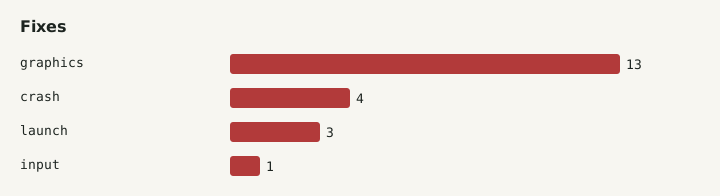
Install build 117 from GitHub and try again. Build 95 is published under the build-94 tag, so check the About screen to see your real build number.
If the PGO package misbehaves, run the standard package of the same build. A problem that only appears in one variant is useful information for the developers.
Open File > Open Lichii Folders > Log Folder and attach eden_log.txt. Note your GPU, driver version and whether DLSS or mods are enabled.
Look through the GitHub issues and the compatibility reports for your game. Builds with PR #303 can submit a desktop compatibility report; build 88 cannot.
Build 116 crashed in amdvlk64.dll on RX 6000, RX 5000, Vega and Polaris cards while the game built its shaders after boot. The driver reports matrix-core support those cards do not have. Build 117 limits the faster matrix path to RDNA3 and newer, so update to build 117.
Use build 70 or anything newer. That release routes the game's DLSS network through a de-jitter stand-in, which removes the black screen, the heavy smearing and the stretched geometry, and it also makes controller input work through HID command 300.
This is a known issue in build 117: characters look too dark, there is a green tint and the frame rate is lower than in earlier builds. The developers list it as being investigated, so there is no setting that fixes it yet. Watch the next release notes.
That bug is fixed from build 116 onward by the foliage work in pull request #551. Update to build 117, which contains the same fix plus the AMD crash repair. Missing vegetation in general was already improved in build 83 through extra shader pointer and storage-buffer bindings.