Lichii Switch 2 Emulator Setup: Install, Keys, Firmware and Saves
Before you startBack up your saves before trying any experimental build. Lichii changes quickly, and the README asks every tester to keep a copy first.
Lichii Switch 2 Emulator setup takes six steps: download the right package from GitHub, unpack it, add your own keys and firmware, check that your existing data directory carries over, and launch a game. Nothing in the download includes games, keys or firmware, so those have to come from a console and games you own. The checklist below saves your progress in this browser, so you can come back to it after a reboot or a driver update.
6Setup steps
4Official desktop packages
2.39Minimum glibc on Linux
15Minimum macOS on Apple Silicon
Setup checklist
0 / 6 steps done
01
Download from GitHub only
Open the Releases page of github.com/zortos293/Lichii and pick the build 117 package for your system. Windows uses a zip, Linux an AppImage or tar.gz, Apple Silicon Macs a dmg or zip. The PGO package is the recommended choice.
Windows x86_64 · Linux x86_64 or aarch64 · macOS arm64
Why it matterslichii.org and similar sites are not the project. Issue #545 reports a zip from that site starting node.exe from %TEMP%.
Windows packages are in-place zips: extract the whole archive to a normal folder and run lichii.exe, or eden-cli.exe from a terminal. On Linux make the AppImage executable with chmod +x, or extract the tar.gz and run ./lichii. On a Mac open the dmg and drag lichii.app into Applications.
AppImage: glibc 2.39+ · tar.gz: system Qt 6 · macOS 15+, not notarized
Why it mattersRunning lichii.exe from inside the zip without extracting leaves the program without its libraries.
Lichii ships without decryption keys. On launch without them the log says Decryption keys are missing: NCA, NSP and XCI games need them. Use the keys from your own console; you will not find keys or download links for them here.
Keys dumped from hardware you own
Why it mattersWithout keys the game list stays empty or games refuse to load, which looks like a crash but is not one.
Without firmware the log line reads Installed firmware: No firmware available. Install firmware taken from your own console. Several games need it for shared fonts and system data, and bug reports in the repository list the installed firmware version next to the game version.
Firmware from your own console
Why it mattersMissing firmware fonts and system archives cause wrong text and failures that do not appear on a full setup.
Lichii keeps using the existing Eden and Eglantine data directories and config keys. It never moves or deletes saves, settings or shader caches. Copy that folder somewhere safe before the first launch of a new build. File > Open Lichii Folders opens it directly.
Free disk space for one copy of your saves
Why it mattersAn experimental build can still corrupt a save. A copy outside the emulator folders is the only reliable rollback.
Start Lichii, add your game folder or use File > Load File, and boot the game. The first run builds shaders, so the first minutes stutter. If something breaks, the log is under File > Open Lichii Folders > Log Folder > eden_log.txt.
Your own legally obtained game dump
Why it mattersAttaching eden_log.txt and your build number is what makes a bug report usable.
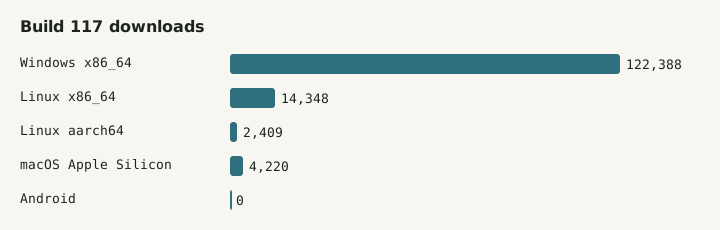
Extract the zip, run lichii.exe. The PGO zip is compiled with a ThinLTO profile trained on Ocarina of Time. Windows accounts for 122,388 of the build 117 downloads.
Linux
The AppImage needs glibc 2.39 or newer: Ubuntu 24.04, Fedora 40, Debian 13 or Arch. Older distributions should use the tar.gz with the system Qt 6 libraries. Packages exist for x86_64 and aarch64.
macOS
Only Apple Silicon on macOS 15 or newer. The app is not notarized, so macOS blocks the first launch until you allow it in System Settings under Privacy & Security.
Build 117 downloads per platform. Android has no official package.
Updating to a newer build
01
Use the updater
From build 75 the in-app updater checks Lichii releases on GitHub and picks the right package for your system (#82).
02
Or replace the folder
Download the new package and extract it over a fresh folder. Your saves stay in the data directory, not in the program folder.
03
Copy saves again
Make a fresh backup before each jump to a new build, especially when release notes mention save or filesystem changes.
Frequently asked questions
Does Lichii include keys, firmware or games?
No. The README states that games, keys and firmware are not included and that you should only use games and system files you have legally obtained. On first launch without them Lichii logs that decryption keys are missing and that no firmware is installed.
Where does Lichii keep my saves?
In the existing Eden and Eglantine data directories, which Lichii keeps using together with their config keys. It never moves or deletes saves, settings or shader caches. File > Open Lichii Folders opens that location so you can copy it before testing a new build.
Do I have to set things up again for every new build?
No. Keys, firmware, settings and saves live in the data directory, so a new build picks them up. From build 75 the in-app updater can fetch the right package from GitHub for you. Back up your saves before each update anyway.
Why does my Mac refuse to open Lichii?
The macOS build is not notarized, so Gatekeeper blocks it on first launch. Allow it in System Settings under Privacy & Security. It also needs an Apple Silicon Mac on macOS 15 or newer; Intel Macs have no official package.